Table of Contents
Preamble
On the documentation
The documentation for inverses is good. I urge you to read and re-read while also following along with the suggestions such as looking at the un compatible list.
Under especially
I'd like to highlight the following block of the Uiua Inverses doc.
undertakes two functions which we will callFandG. It callsF, then callsG, then "undoes"F. Whileundersometimes usesun Fas its undoing function, many functions that do not work withunwork withunderbecauseundercan keep track of context. One example of this in action isunder pick, which allows us to modify an element or row of an array.-Uiua docs
    ⍜(⊡2|×10) [1 2 3 4]
[1 2 30 4]
The context in this case is the array. Let's examine
# Let's select elements 1 and 3 out of an array
    ⊏ 1_3 [1 2 3 4 5]
[2 4]

# The 'context' for the selection is
# the array [1 2 3 4 5]

# Now let's consider under on this selection
# and do something simple like adding 100
    ⍜(⊏ 1_3|+ 100) [1 2 3 4 5]
[1 102 3 104 5]
So tracing the steps very informally:
- - [2 4] is selected
- - Context is [1 HERE 3 ALSO_HERE 5]
- - [2 4] has +100 applied → [102 104]
Now under, keeping the context, knows to replace HERE with 102 and ALSO_HERE with
104, hence output: [1 102 3 104 5].
Challenge 1
Write a program that adds 100 to the 2nd and 4th rows of an array.
C1 Solution
⍜(⊏1_3|+100)and the idiomatic solution
⍜⊙⊏+ 100 1_3Why?
See preamble section on under.
# `under` does F, applies G and finally undoes F.
# Let's break down the F and G of `under(F|G)`

# F: If we only run select 1_3 on an array
#  We get back the list of selections
    ⊏ 1_3 [100 90 80 70 60]
[90 70]

# G: Then operating on those
    + 100 [90 70]
[190 170]
However, under keeps the context,
the original array [100 90 80 70 60] selected from,
and returns the altered elements to their previous places.
After selecting, [90, 70] you can imagine the context
to be [100 PREV 80 PREV_2 60].
PREV was originally 90, PREV_2 was originally 70.
G is applied, resulting in [190 170].
In undoing F
- - 190 is slotted into PREV
- - then 170 is slotted into PREV_2
    ⍜(⊏ 1_3|+ 100) [100 90 80 70 60]
[100 190 80 170 60]
What about the idiomatic solution?.
⍜⊙⊏+ 100 1_3Looking at this function in isolation is perhaps confusing. Why do we need dip there? Why can't we just omit the dip and reverse the inputs? Let's try it with [1 2 3 4 5]
    ⍜⊏+ 1_3 100 [1 2 3 4 5]
"Error: Index 1 is out of bounds of length 1"
Ah, because select 1_3 tries to operate on 100.
But isn't this then a symptom of dynamic inputs and test cases?
The dip is there to deal with the test input appearing last.
If that weren't the case we could just write
    ⍜⊏+ 1_3 [1 2 3 4 5] 100
[1 102 3 104 5]
OK. But hang on, both functions, F and G need inputs.
How does that work with under?
Well, the inputs simply just follow.
Here's a parenthesized version to clarify the one above
# `under(F|G) (<args for F>) (<args for G>)`
    ⍜(⊏|+) (1_3 [1 2 3 4 5]) (100)
[1 102 3 104 5]
Well, but [1 2 3 4 5] is destined to appear last in the input.
The dip is then more accurately there to deal with
the fact that 1_3 [1 2 3 4 5] is the sequence that select needs
to see. It is easy to conjure this sequence with 100 1_3,
and dipping out the 100, which is then given back to the add.
    ⍜⊙⊏+ 100 1_3 [1 2 3 4 5]
[1 102 3 104 5]
Challenge 2
Write a program that transposes an array so that the last axis becomes the first.
C2 Solution
°⍉Why?
Disclaimer: 3D, or higher dimensional transformations, are not my specialty. In fact, I know very little. I think they are more useful in understanding the solution, when using shape. Take the following with a grain of salt.
# Let's make a 3D array to play with
    F ← °△ 2_3_4

# What does F look like?
    F
╭─
╷ 0 1  2  3  12 13 14 15
╷ 4 5  6  7  16 17 18 19
  8 9 10 11  20 21 22 23
                         ╯
# unshape 2_3_4 gives the right shape?
    △ F
[2 3 4]

# What does a transform on F look like?
    ⍉ F
╭─
╷ 0 12  4 16   8 20
╷ 1 13  5 17   9 21
  2 14  6 18  10 22
  3 15  7 19  11 23
                    ╯
# Then the shape?
# Seems like the shape "rotated" such that
# the first element loops back to the end
    △ ⍉ F
[3 4 2]
Wouldn't then un trans "rotate" the other way?
The last element loops back to the beginning?
The problem statement wants 'the last axis to become the first',
so this seems like a good candidate.
# The solution, untransform,
# what does that look like?
    °⍉ F
╭─
╷  0  4  8   1  5  9   2  6 10   3  7 11
╷ 12 16 20  13 17 21  14 18 22  15 19 23
                                         ╯
# Does it "rotate" the shape like we want?
    △ °⍉ F
[4 2 3]

# But, for a 3D matrix that's the same as transforming twice?
    △ ⍉ ⍉ F
[4 2 3]

# Indeed it is
    ⍉ ⍉ F
╭─
╷  0  4  8   1  5  9   2  6 10   3  7 11
╷ 12 16 20  13 17 21  14 18 22  15 19 23
                                         ╯
But what does a transform mean? What is it?
I am not too sure myself. I would appreciate some correspondence here from people more knowledgeable. Feel free to mail to: [email protected]. In the case of a 3D matrix I think it is similar to re-orienting a cube.
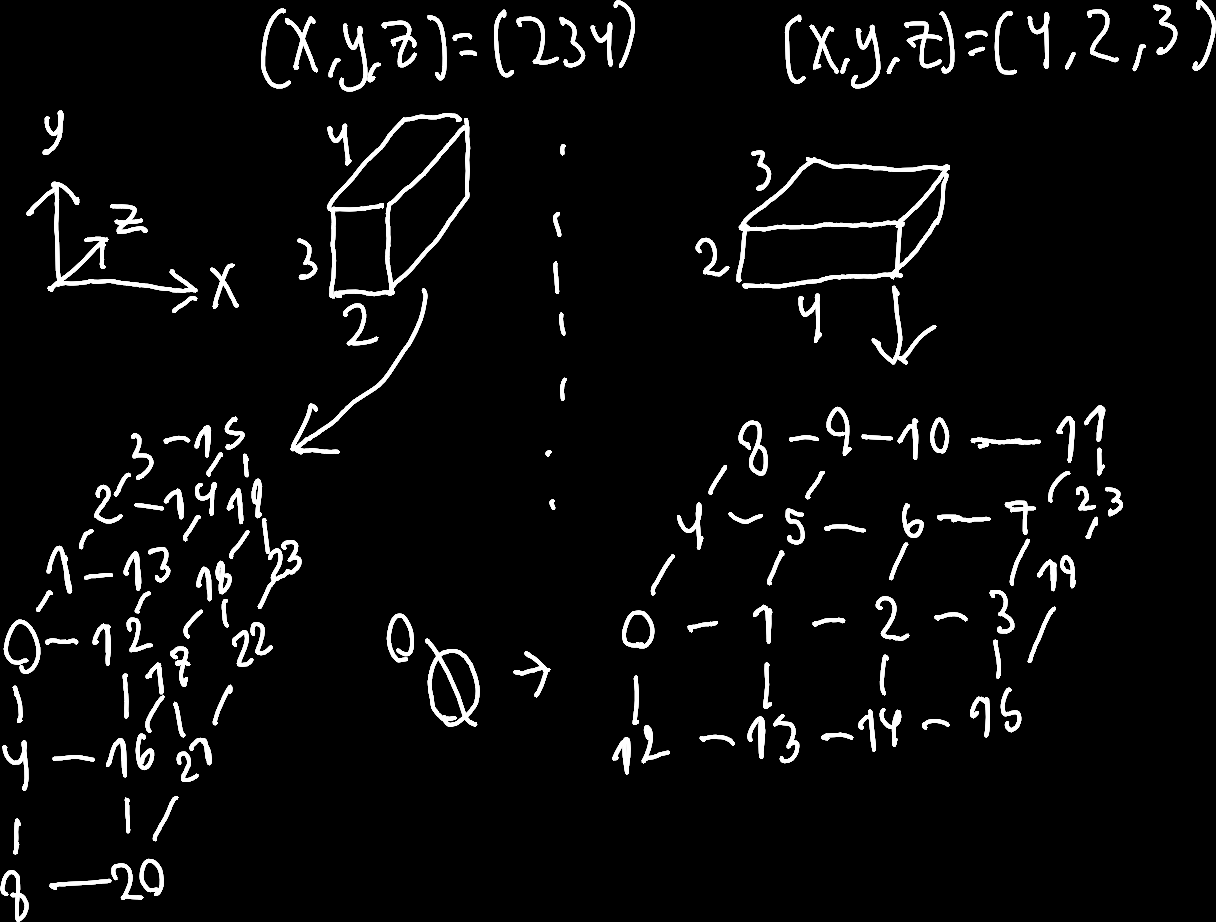
At least, I feel like "drawing" a cube of numbers for a 3D matrix helps me
understand it a little in the context of the transformation. We construct
the cube from the x y z axes and fill in the corresponding numbers.
Enjoy, or not, these mad scribbles below.
Challenge 3
My solution
⍜(⊢ ⍉|× 10) Fthen the intended solution
≡⍜⊢(×10)and finally the idiomatic solution
⍜≡⊢×₁₀C3 Solution
Why? My initial solution.
This is not an ideal solution. So why show this solution then?
Firstly, it passes the challenge tests despite being different from the intended solutions. If this happens to you, try examining why. Here, the action of transforming an array does more work than is needed, that is to say, it affects more than just the first column.
Secondly, seeing more examples of under is good for you :)
Anyway, here was my thought process.
# Let's declare F as a 2D matrix
    F = [1_2 3_4]

# What does the repl show?
    F
╭─
╷ 1 2
  3 4
      ╯

# Well then. The first column, 1 and 3,
# is our target for mul 10
# We want to end up with
# ╭─
# ╷ 10 2
#   30 4
#       ╯

# Wouldn't it be ideal if we could just
# `under (first | mul 10)`?
# But, first doesn't get columns.
    ⊢ F
[1 2]

# Didn't we use "rotations" earlier?
# What does it look like if we transform F?
    ⍉ F
╭─
╷ 1 3
  2 4
      ╯

# That looks like the target
    × 10 ⊢ ⍉ F
[10 30]

# So, can `under` reverse (or find an inverse)
# to `first trans`?
    ⍜(⊢ ⍉|× 10) F
╭─
╷ 10 2
  30 4
       ╯
Indeed!
under (first trans|mul 10) passes on
[1 3] to the mul 10 function and then
undoes the first trans transformation.
Why? Intended solution.
For this problem, trans is costly, how could we only target the numbers we want?
You may recall the rows modifier. We can use it to target each row of a matrix.
After that we can use the first modifier to target the first item of each row.
This boils down to selecting the first column of a matrix.
Here's an example where we square each element in the first column of a matrix.
# Let's initialize F
    F ← [1_2 3_4 5_6]

# Notice that the first column is 1 3 5
    F
╭─
╷ 1 2
  3 4
  5 6
      ╯
Let's do the following:
- - For every row (
rows) -
- + Get the first element (
first)
- + Get the first element (
-
- + multiply by itself (
self mul)
- + multiply by itself (
    rows first self mul F
    ≡⊢ ˙× F
[1 9 25]
This is fine, but we want to give the items back This is what under is for, isn't it? So let's change the recipe
- - For every row (
rows) -
- + Do the following and then reverse (
under)
- + Do the following and then reverse (
-
-
- * Get the first element (
first)
- * Get the first element (
-
-
-
- * multiply by itself (
self mul)
- * multiply by itself (
-
    ≡⍜⊢˙× F
╭─
╷  1 2
   9 4
  25 6
       ╯

# Wowee, so what if we replace `self mul`
# with `mul 10`
    ≡⍜⊢ × 10 F
╭─
╷ 10 20
  30 40
  50 60
        ╯
Well, heck. What happened?
under takes two functions, some G and H.
The two functions that under sees is first and mul.
Since under first mul applies mul the function signature
is the same as mul's, '2.1'. That is, 2 inputs 1 output.
rows is therefore modifying a function that takes two arguments
Let's debug ? what under first mul does at each step
    ≡(⍜⊢ × ?) 10 F
┌╴? 1:8
│╴╴╴╶╶╶
├╴[1 2]  # Multiplies 10 and [1 2] -> [10 20]
├╴10
└╴╴╴╴╴╴
┌╴? 1:8
│╴╴╴╶╶╶
├╴[3 4]  # Multiplies 10 and [3 4] -> [30 40]
├╴10
└╴╴╴╴╴╴
┌╴? 1:8
│╴╴╴╶╶╶
├╴[5 6]  # Multiplies 10 and [5 6] -> [50 60]
├╴10
└╴╴╴╴╴╴  # Rows then collects this into an array
╭─
╷ 10 20
  30 40
  50 60
        ╯

# The `first` function just returns 10 (first 10) and this is
# used as an argument to each row of F. Therefore this is equivalent
# to:
     ≡× 10 F
╭─
╷ 10 20
  30 40
  50 60
        ╯
Wowee. Let's unwind this tangent. We now see we need to
make sure that mul 10 is used wholesale by under.
We can surround it with parentheses (mul 10),
which is what the intended solution does,
or we can use the subscripted version. mul,10.
    ≡⍜⊢×₁₀ F
╭─
╷ 10 2
  30 4
  50 6
       ╯
The subscripted mul,10 works without parentheses
because it acts as a single 1 input 1 output function.
Whereas mul 10 is mul with its first argument (out of two).
And the idiomatic?
It uses the subscripted trick for mul,10.
Then for under G H
- G:
rows first. Gets the first of each row - H:
mul,10. Multiplies by 10
So, following the mantra of under:
First do G, then apply H then "undo" G.
    ⍜≡⊢×₁₀ F
╭─
╷ 10 2
  30 4
  50 6
       ╯
Rows under vs under rows?
The intended and idiomatic solutions use either under rows
and rows under. What gives?
Let's consider it briefly.
In the case of rows under we apply under G H on each row.
However, under rows is not simply swapping the order.
# Let's add redundant parentheses to emphasize
# what the parser 'tokenizes' for the idiomatic.
    ⍜(≡⊢)(×₁₀) F

# This in contrast to the intended solution
    ≡⍜(⊢)(×10) F
There isn't any under rows. What we see is under with rows first
as its first function and mul,10 as its second.